Key takeaways
- Ask every customer for a review at the right moment, with a direct link or QR code.
- Reply to every review, positive or negative, calmly and specifically.
- Never offer incentives, filter who you ask, or write or buy reviews; Google prohibits it.
- In the UK, fake and hidden-incentive reviews have been banned by law since 6 April 2025, with fines up to 10% of global turnover.
- In the EU, if you display reviews on your site you must say whether and how you check they’re genuine.
Reviews are word of mouth for the internet age. Before trying a new restaurant, booking a treatment or calling a tradesperson, most people check what others have said — and a business with plenty of recent, genuine reviews feels like a safe choice.
The good news is that most happy customers are perfectly willing to leave a review. They just need to be asked, at the right moment, in a way that takes ten seconds. This guide shows you how — and, just as importantly, which shortcuts to avoid, because the rules in the UK and EU have become much stricter.
Why reviews matter so much
Reviews help in three ways at once:
- They build trust. A steady flow of recent reviews tells new customers that you’re active and that people like what you do.
- They help you get found. Reviews are part of how Google decides which local businesses to show, and AI assistants increasingly draw on them when recommending places (see our guide to getting recommended by AI assistants).
- They tell you what to improve. Honest feedback — even the uncomfortable kind — is free market research.
How to ask (without being awkward)
1. Ask everyone, at the right moment
The best moment is just after a good experience: when the customer pays, when the haircut is finished, when the order is delivered. A simple, friendly line works: “If you enjoyed it, a Google review really helps a small business like ours.”
The important part is everyone. Don’t pick only the customers you think were happy — we’ll come to why in a moment.
2. Make it ten seconds, not ten minutes
Every extra step loses people. In your Google Business Profile you can copy a direct review link that opens the review box straight away. Put it:
- On a small card or sign by the till, as a QR code
- In your booking confirmation or follow-up email
- On receipts and invoices
- In your Instagram bio or Stories highlight
3. Follow up once, politely
If you send a thank-you message after a booking or delivery, include the review link once. One reminder is helpful; three is pestering.
How to reply to reviews
Replying to every review, good or bad, shows future customers that real people care about the business.
Positive reviews
Thank them by name, mention something specific, and keep it short: “Thanks so much, Ana — we’re glad you loved the croquetas. See you again soon!” Avoid copying and pasting the same reply everywhere.
Negative reviews
These matter even more, because future customers read your reply as much as the review.
- Wait until you’re calm. Never reply in the heat of the moment.
- Thank them and acknowledge the problem without arguing about details in public.
- Explain briefly what you’ve done or will do about it.
- Offer to continue privately — a phone number or email address.
- Never share personal details about the customer or their booking.
If a review is fake, offensive or clearly breaks Google’s rules, you can report it from your Business Profile. Don’t try to argue it away in the reply.
The rules: what you must not do
This is where many businesses get caught out. Both Google and the law are clear that reviews must be genuine and honestly collected.
Google’s rules
Google’s policies for user-contributed content prohibit fake engagement. That includes:
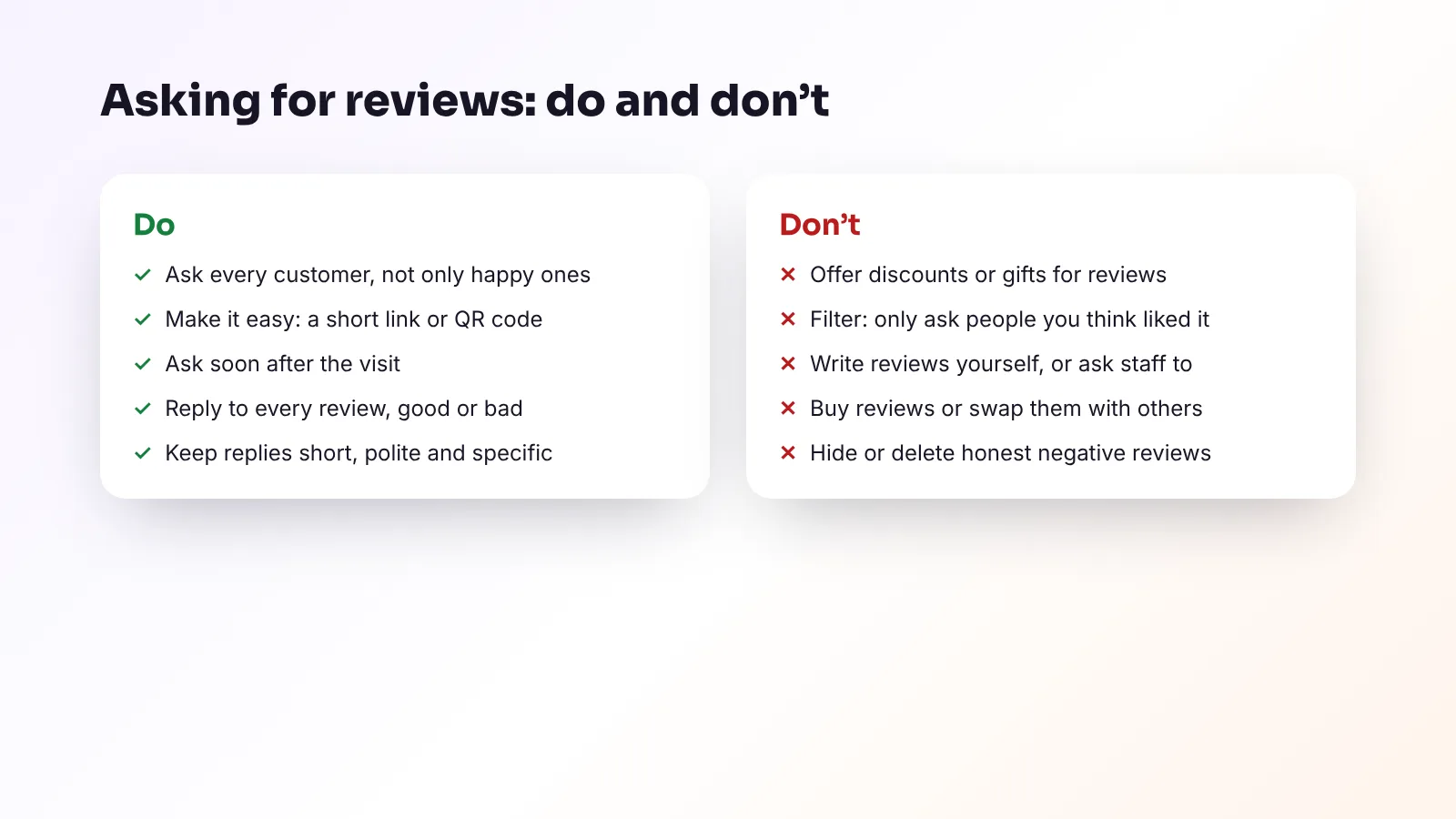
- Offering incentives — discounts, free items or prize draws — in exchange for reviews
- “Review gating” — discouraging negative reviews or only asking customers you expect to be positive
- Reviews written by owners, staff or anyone paid to post them
- Posting reviews for a competitor, or swapping reviews with other businesses
Breaking these rules can get reviews removed and, in serious cases, restrictions placed on your profile.
In the UK: fake reviews are now banned by law
Since 6 April 2025, the Digital Markets, Competition and Consumers Act 2024 explicitly bans fake reviews in the UK. That covers reviews that pretend to be from a real customer when they aren’t, and reviews that hide the fact they were incentivised. Commissioning or facilitating fake reviews is banned too.
The Competition and Markets Authority (CMA) can now enforce consumer law directly, with fines of up to 10% of a business’s global turnover. It has published guidance explaining what it expects businesses to do to prevent and remove fake reviews.
In the EU: be open about how reviews are checked
Under the EU’s Omnibus Directive (2019/2161), applied since 28 May 2022, buying, selling or posting fake consumer reviews is prohibited, and so is misrepresenting reviews — for example by only showing the positive ones. If you display reviews on your own website, you must also tell visitors whether and how you check that they come from people who actually used or bought from you.
UK businesses that sell to customers in the EU need to follow these rules too.
Simple ideas that work
- A small table card or counter sign with a QR code: “Enjoyed your visit? Tell us on Google.”
- A thank-you email after bookings with a single, clear review link
- A Stories highlight called “Reviews” where you share genuine reviews (with permission)
- A monthly team target for asking — not for star ratings, just for remembering to ask
- Sharing your best reviews on social media with the reviewer’s first name only
Frequently asked questions
Can I offer a discount for a Google review?
No. Google’s policies prohibit offering incentives for reviews, and in the UK reviews that hide an incentive are banned by law. Ask politely instead.
Can I only ask happy customers for reviews?
No. Selectively asking customers you expect to be positive, known as review gating, is against Google’s policies. Ask everyone.
Should I reply to negative reviews?
Yes. A calm, helpful reply shows future customers how you handle problems. Thank the reviewer, acknowledge the issue, explain what you’ll do and offer to continue privately.
Can I delete bad Google reviews?
You can’t delete reviews simply because they’re negative. You can report reviews that break Google’s rules, such as fake or offensive ones.
The bottom line
Ask every customer, make it effortless, reply to every review and never pay for, fake or filter them. Done consistently, that’s enough to build a strong, trustworthy review profile — and it keeps you on the right side of Google and the law.
At Viraluna we help clients turn great reviews into great social media content, and keep their Google presence in shape. See how it works or get a free quote.