Key takeaways
- For food businesses, social media is a digital menu and shop window: people check it before they book or walk in.
- Post 3–5 times a week plus Stories: dishes, the team, the atmosphere, offers and customers.
- Photograph food in daylight, close up and fresh — never under harsh overhead light.
- Make booking effortless: link in bio, opening hours and menu always one tap away.
- Keep your Google Business Profile, menu and hours identical to your social profiles.
Few businesses are as naturally suited to social media as restaurants and cafés. Food is visual, atmosphere is shareable, and deciding where to eat is exactly the kind of choice people make on their phones. Done well, social media fills quiet tables and builds regulars. Here’s a practical playbook.
What diners look for before they visit
Before choosing somewhere new, people typically want to know:
- What’s on the menu and roughly what it costs
- What it looks and feels like inside — date night, family lunch, laptop-friendly?
- Whether you’re open right now, and how to book
- What other people say — reviews and real photos
- Practical details — dietary options, terrace, dogs, accessibility, parking
Your feed, bio and highlights should answer all of these within seconds.
Set up your profile like a menu board
- Bio: what you are, where, and one line that makes you different. Add opening hours if space allows.
- Link: a booking page or a simple link page with booking, menu and directions.
- Highlights: Menu, Drinks, Reviews, Events, Find us. Keep the menu highlight current.
- Contact buttons: call, directions and email, so mobile visitors can act instantly.
What to post: the restaurant content mix
- Signature dishes — your best-sellers, close up and freshly plated.
- New and seasonal items — with the date they start and how long they’re around.
- Behind the pass — prep, plating, the chef at work. Short Reels work brilliantly here.
- The team — the people who make the place: chefs, baristas, front of house.
- Atmosphere — the room at golden hour, the terrace, a full Friday night.
- Offers and events — set menus, live music, quiz nights, holiday bookings.
- Customers — real moments and genuine reviews (always with permission).
- Local — suppliers, producers, the neighbourhood.
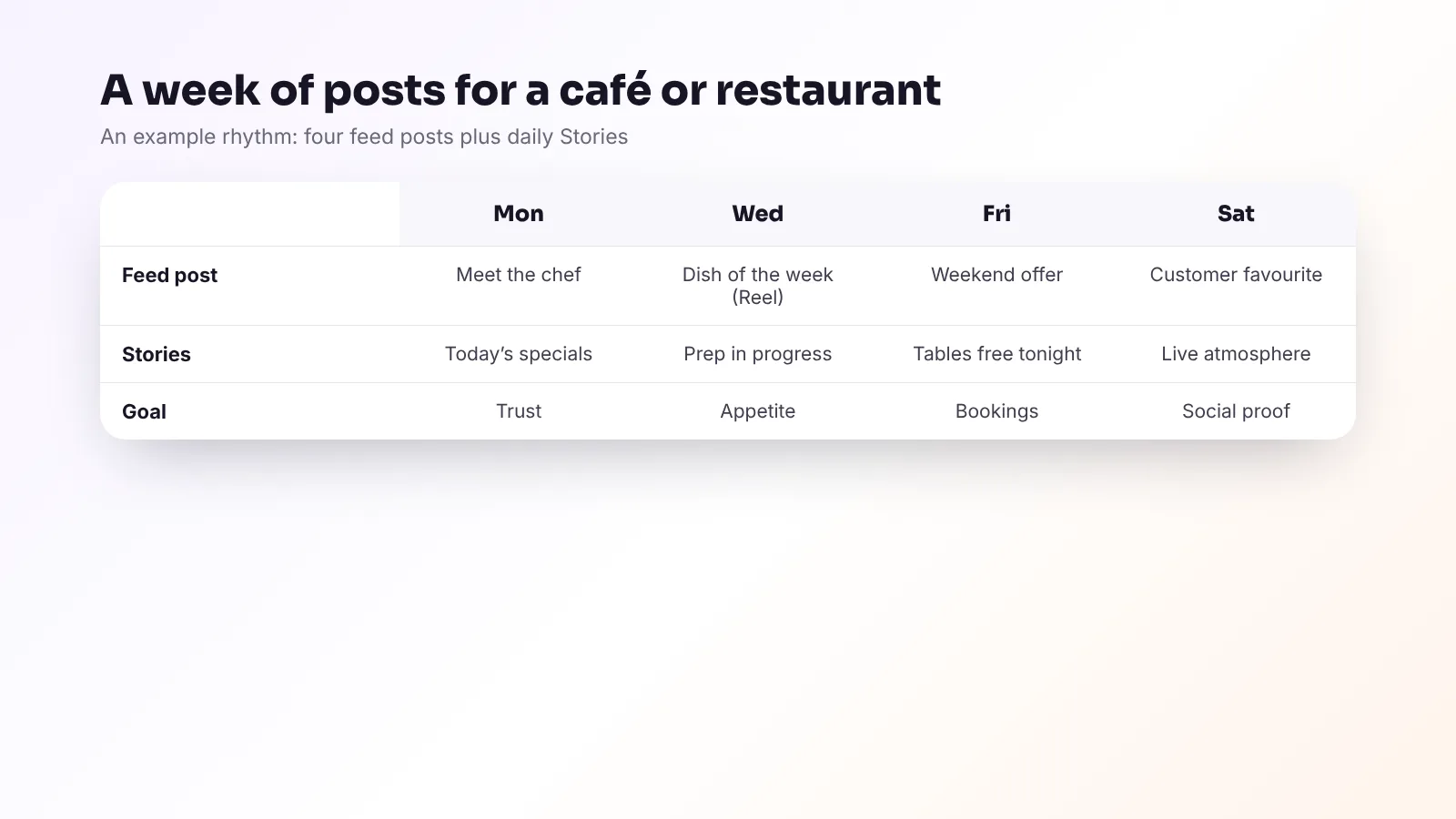
A weekly rhythm that works
Most restaurants do well with three to five feed posts a week and Stories on service days. Time your posts for when people decide: lunch ideas in the late morning, dinner and weekend plans in the afternoon. Your account insights show when your own followers are most active. See how often a local business should post for more.
Food photos that make people hungry
- Daylight by a window, flash off, overhead lights off.
- Shoot fresh — the moment it’s plated, before steam and shine disappear.
- Angles: from above for pizzas, bowls and spreads; at 45° for most plates; eye level for burgers, cakes and drinks.
- Clean, simple backgrounds — a wooden table, a plain plate, a hand reaching in.
- Show texture and movement — a pour, a slice, a drizzle, steam rising.
- Edit lightly so the dish looks like what arrives at the table.
Our full phone photography guide has more tips and the right sizes for each platform.
Video ideas for food businesses
Plating a signature dish. The first coffee of the morning. Pizza going into the oven. A cocktail being made. A 15-second tour from door to terrace. A “what we eat on a staff break” Reel. For thirty more, see our Reels ideas for local businesses.
Turn followers into bookings
- Every offer gets a deadline and a clear action: “Book for Friday via the link in bio.”
- Use Stories for real-time availability — “Tables free tonight from 19:30.”
- Pin your best posts — the menu, your signature dish and how to book.
- Reply to every comment and message, quickly. A question about a table is a booking waiting to happen.
Don’t forget Google
When people search “restaurants near me”, your Google Business Profile often matters more than Instagram. Keep your hours, menu link and photos up to date, post weekly updates, and reply to reviews. Our Google Business Profile checklist and reviews guide cover it step by step.
Allergens and accuracy
Be careful with claims about allergens and dietary suitability in posts. In the UK and EU, food businesses must give allergen information for the foods they serve, so make sure anything you post (“gluten-free”, “vegan”) is accurate and consistent with what staff tell customers. When in doubt, invite people to ask your team.
Frequently asked questions
How often should a restaurant post on Instagram?
Three to five feed posts a week plus Stories on service days is a good, sustainable rhythm for most restaurants and cafés.
What should a café post on social media?
Signature drinks and dishes, new and seasonal items, behind-the-scenes prep, the team, the atmosphere, offers and events, and genuine customer moments.
What is the best time for a restaurant to post?
Post before people decide where to eat: late morning for lunch and afternoon for dinner and weekend plans. Check your own insights to see when your followers are most active.
Should a restaurant use TikTok?
If you can create short, authentic videos regularly, TikTok can work very well for food businesses. Start with Instagram Reels and reuse the best videos on TikTok.
How do I get more bookings from Instagram?
Make booking one tap away in your bio, add a clear call to action and deadline to every offer, post real-time availability in Stories, and reply quickly to messages.
The bottom line
Show the food, the people and the atmosphere; make booking effortless; and keep Instagram, Facebook and Google consistent and current. Do that every week and social media becomes one of your most reliable ways to fill tables.
Viraluna works with restaurants, cafés and bars across the UK and Europe — you share photos and specials, we create and schedule the posts, and you approve everything from your phone. Get a free quote.